
Introduction
Renamed Packages will cause deployment issues for deployments if the following steps are not followed.
Issues
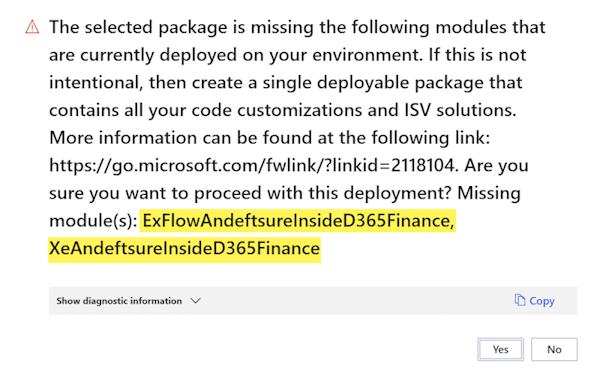
Renamed packages might generate similar messages in DevOps while deploying new changes.

Renamed packages might generate similar messages in LCS while deploying new changes.
Resolution
These renaming are likely to cause the above issues if you had some of our packages previously deployed. To resolve this issue, let's follow the steps in Uninstall a package
This can be achieved in 2 ways:
Manual
Create a new text file called ModuleToRemove.txt and add the following lines:
eftsure
ExFlowandeftsureinsideD365Finance
XeAndeftsureInsideD365Finance
eftsureInsideTreasuryAutomationSuite
eftsureProjectManagement
Only add lines for modules in use.
Add this new file into your existing zip package, in the following path:
\AOSService\Scripts\ModuleToRemove.txt
Automated
Add a new powershell step to your devOps pipeline, after the deployable package has been created.
Feel free to add & customize the below script to the new task inline script.
This script can be used to duplicate your ALL_IN_ONE_PACKAGE and adds the ModuleToRemove.txt automatically into the zip package file, to handle the package being renamed/deleted.
$path = "$(Build.ArtifactStagingDirectory)\ALL_IN_ONE_PACKAGE\" #Change path to match your pipeline
$archiveSrc= $path + "SOURCE.zip"                               #Change filename to match your pipeline
$archiveRes= $path + "RESULT.zip"                               #Change filename to suit your output

$pathZip = $path + "Zip\"
$newFile = $pathZip + "AOSService\Scripts\ModuleToRemove.txt"
$filesToZip = $pathZip + "*"

Remove-Item -Path $pathZip -Recurse -Force -ErrorAction SilentlyContinue
Expand-Archive -Path $archiveSrc -DestinationPath $pathZip
@("eftsure", "ExFlowandeftsureinsideD365Finance", "XeAndeftsureInsideD365Finance",
"eftsureInsideTreasuryAutomationSuite", "eftsureProjectManagement") | Out-File -FilePath $newFile
Compress-Archive -Path $filesToZip -DestinationPath $archiveRes -Force
Remove-Item -Path $pathZip -Recurse -Force
LCS
Once the Uninstall package process is successful and the package is uploaded into LCS, the following information will be displayed alongside the package in the LCS > Asset library > Software deployable packages:
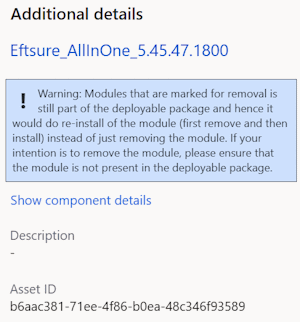
This message is valid since the packages have been renamed and will therefore be redeployed under a new name.