
Deployment
This user guide will walk you through all the processes relevant to deployment of Eftsure's extension: Eftsure inside Microsoft Dynamics for Finance and Operations.
Three distinct methods are used for deployment depending on the target environment.
The first deployment is for your initial Development environment. You will receive / download a copy of our latest release (deployable package) that your deployment team will first deploy into your Development environment and source control.
For all other Development environments, your developers will deploy our latest release to their development machine by calling a Get Latest in Visual Studio.
For all Tier2+, the Deployable Package will need to be built including all other packages (All In One Package) and deployed using LCS features.
We deploy binaries using Software Deployable Packages, the source code is not deployed. The Software deployable packages files are shipped by Eftsure into LCS for all customer. We encourage you to be on the latest version that you will find on LCS as Upgrades are self-service.
For Live environments, the same Deployable Package approved in Test will be deployed using LCS features, after testing and approval in Test.
It's important to understand each deployment technique prior to performing a deployment of our latest release.
For more information, please refer to the following:
For on premise deployments, please refer to the following:
Updates are applied using deployable packages. Applying updates causes system downtime. All relevant services will be stopped, and you won't be able to use your environments while the package is being applied. You should plan accordingly.
On Premise
This user guide describes the release process for all environments deployed through Lifecycle Services, on-premise release documentation is not available at this date.
This user guide describes the LCS deployment features only, the Deployable Packages are standard, and therefore can also be deployed via command line to on premise environments or cloud environments:
Upgrades
Upgrades are slightly different from first time installs, please see Upgrades for more details.
Troubleshoot package deployment failures
If package deployment fails, see the Troubleshoot package application issues topic.
Packages
Eftsure ships multiple packages in LCS and PPAC format(s):
- Eftsure inside D365 (core features)
- Eftsure inside ExFlow (to be installed for ExFlow customers)
- Eftsure inside Xe (to be installed for Xe customers)
- Eftsure inside Corpay (to be installed for Corpay customers)
- Eftsure inside Treasury Automation Suite (to be installed for Treasury Automation Suite customers)
The packages architecture looks like the following:
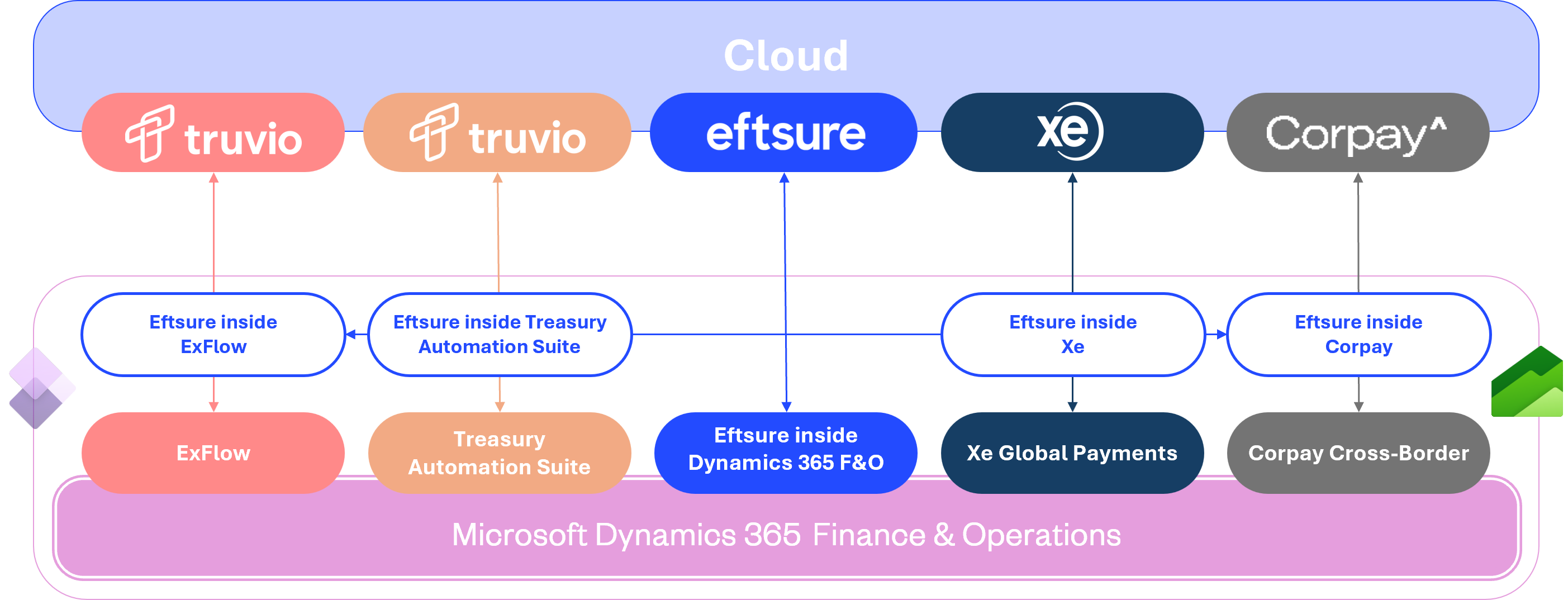
The main package can be deployed on it's own,
The partner packages require their matching partner packages and will fail if not available.
Please see our partners to get their packages.
Important:
In all scenarios, make sure to clean the packages folder for each package. For more information,
Please refer to Clean Packages.
Deployment from LCS
Receive an LCS invitation for the project from Eftsure,
Go to LCS, then Solution Management.
If the Eftsure solution is not yet available, select Import and import the solution.
Go to LCS > Project > Asset Library > Software deployable package > Find Eftsure package(s).
Deployable package to your environment.
Deployment from command line
Alternatively, the deployment can be achieved via command line.
Find the latest Eftsure package and download it to c:\Temp\EftsurePackage
Extract Eftsure package to C:\Temp\EftsurePackage
Please use a short directory name with no spaces to avoid potential file name issues
Run the following script in PowerShell as Admin, to unblock the files.
dir -Path c:\\temp\\EftsurePackage -Recurse | Unblock-File
Close PowerShell,
Due to previous issues, it is recommended to clean Eftsure package(s), see clean Packages
Deploy the latest Eftsure package:
[AxUpdateInstaller QuickInstallAll]
Download file, copy to c:\Temp
Deployable Package
If you have a deployable package, install deployable packages from the command line or from LCS:
Deploy to UDE Environment(s)
Check for Power Platform CLI
First, you will need to make sure Power Platform CLI has been deployed:
- Check whether Power Platform CLI is already installed
- Install Power Platform CLI via msi
- Power Platform CLI command reference
Install PPAC Package
To install our PPAC deployable packages onto a UDE environment:
- Download the latest PPAC deployable package from the latest release
- Extract your downloaded package(s) and export it to C:\temp\EftsurePackage
Please use a short directory name with no spaces to avoid potential file name issues
- Run the following script in PowerShell as Admin, to unblock the files.
dir -Path c:\\temp\\EftsurePackage -Recurse | Unblock-File
- Connect to Power Platform Admin Center
- Navigate to Environments
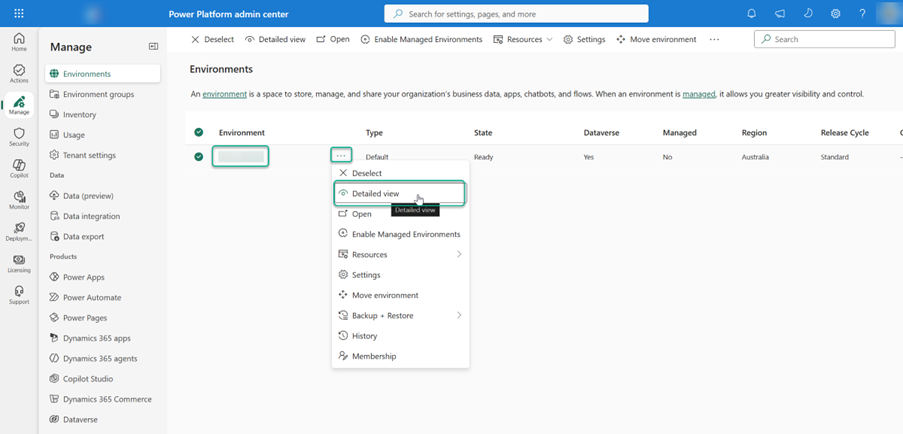
- Select the target environment for deployment and copy the Environment URL for the next step
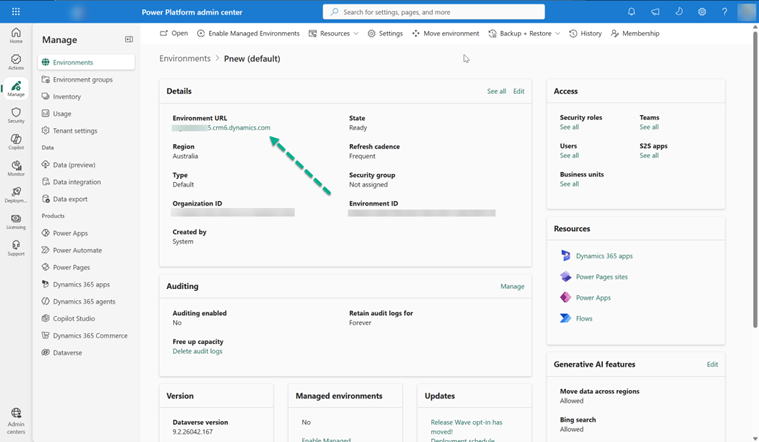
- Open a new instance of Powershell as Administrator and run the following command to connect to your UDE environment:
pac auth create --environment ENVIRONMENTURL
- Then run the following command to trigger deployment of the specified deployable package directly to your UDE environment:
pac package deploy --package C:\\temp\\EftsurePackage\\TemplatePackage.dll –logConsole
- Once completed, the message Package deployed successfully confirms successful deployment
Check deployment version
To confirm deployment successes, we can check the Eftsure model versions on the target environment to make sure that the upgrade has been successful.
On any screen, click the Question mark at the top of your screen, select About
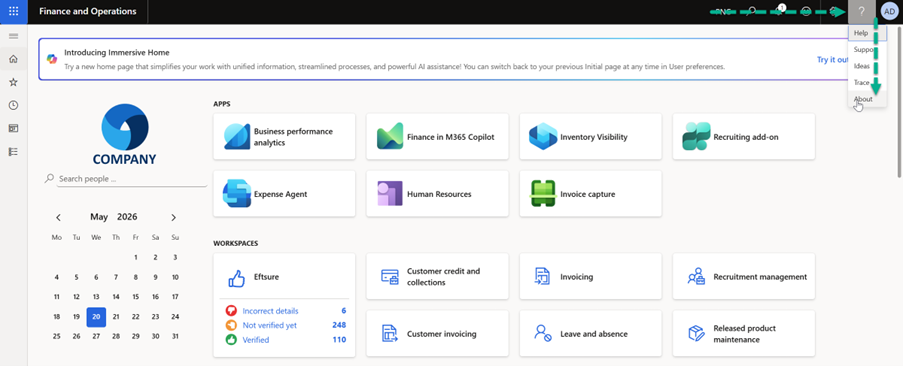
On the next screen, Open the Version tab:
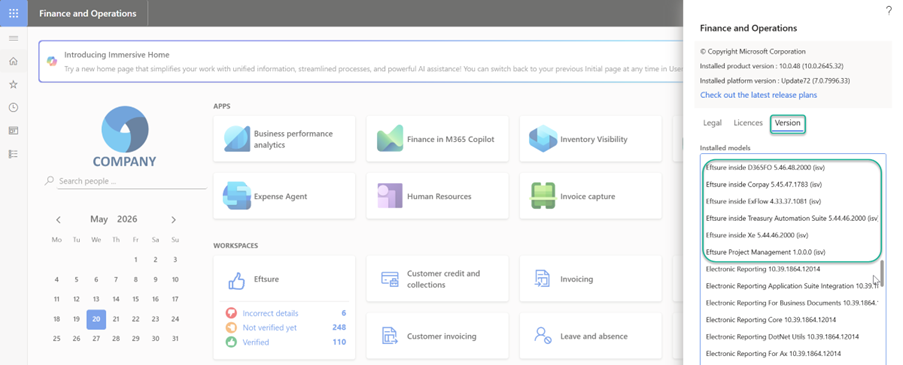
Then make sure the package(s) version match the expected versions.
See Versions for more information