
Troubleshooting
Packages
Using a second dev box:
In case of deployment issues, the developer can try to use a second dev environment to validate that no files are missing from source control.
On the second dev environment:
-
Clean package
-
Perform get latest
-
Redeploy package
-
Go to Source Control Explorer
-
Select "Add items to folder" on the EFTSure folder
-
Make sure that there are no files listed (in either include or exclude)
-
Check-in / Redeploy
Other ideas that might have helped on troublesome deployments:
- Deploying ISV extensions on an empty DB, then restoring DB over.
- Turning off all flighting options (Feature Management)
- Reprovisionning environments
Deployable packages:
The deployable packages shipped at Eftsure are zip files containing a single model, all clearly labelled with a version number.
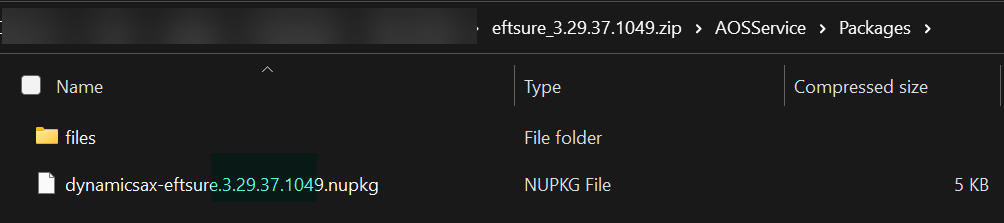

This software package is usually bundled by the customer or their partner into an 'All in One' package to be deployed with additional code to Tier2+ environments.
This 'all in one' package should Eftsure files with the same version number that you are expecting and the Eftsure zip file should contain the same number of files as the SDP shipped by Eftsure.
If that's not the case or the Eftsure package is versioned as 1.0.0.0, an issue is likely present and files might be missing, this software deployable package will be unlikely to deploy successfully.
Please revisit your deployment and release pipeline, checking for version number and file numbers after each and every step. To this day, the likely causes for such errors are the following:
Issues with services not stopping
Files being locked by the system during deployment
Missed files during checkin/merge
Eftsure does not ship any package with v1.0.0.0, clearly indicating an error. Please involve support if you are struggling.
Labels or Reports
When defining which artifacts or source code to copy (often used in standard build pipelines), additional expression instructs the CopyFiles@2 task to find and copy any files or folders that exist inside an ISV solution directory, regardless of where that directory sits in the root path.
When labels or reports are missing, please check your CI/CD pipeline for CopyFiles@2 task and make sure the following folders are included in the copy:
**/bin/****/Reports/****/Resources/**
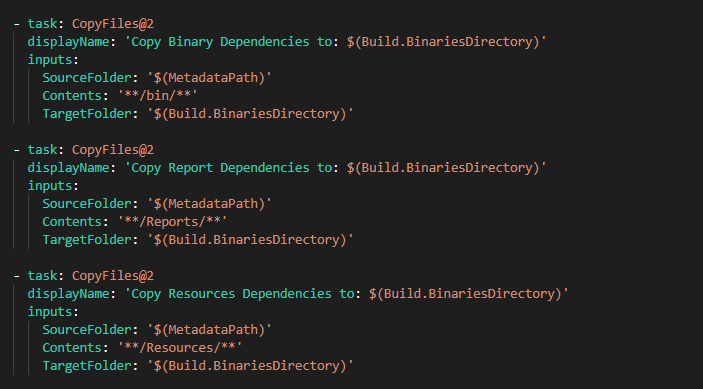
The same applies for all ISV solutions.
Please note the usage of 2 stars **
*copies all files in the specified source folder.**copies all files in the specified source folder and all files in all sub-folders.**\bin\**copies all files recursively from any bin folder.