
Hold
Eftsure security is applied at the bank account verification level, during payments, which is enough to enforce Eftsure protection.
Some of our customers still want to use the vendor level hold status, in parallel to Eftsure verifications.
This article describes our features to assist the customer in this direction, including standard Vendor inactivation job.
We do not recommend the Hold configuration options as they introduce a new level of complexity and may confuse users for unjustified reasons.
Please take the time to understand how our blocking rules apply and how multiple bank accounts can impact the logic below.
The hold configuration is available in our vendor group settings:
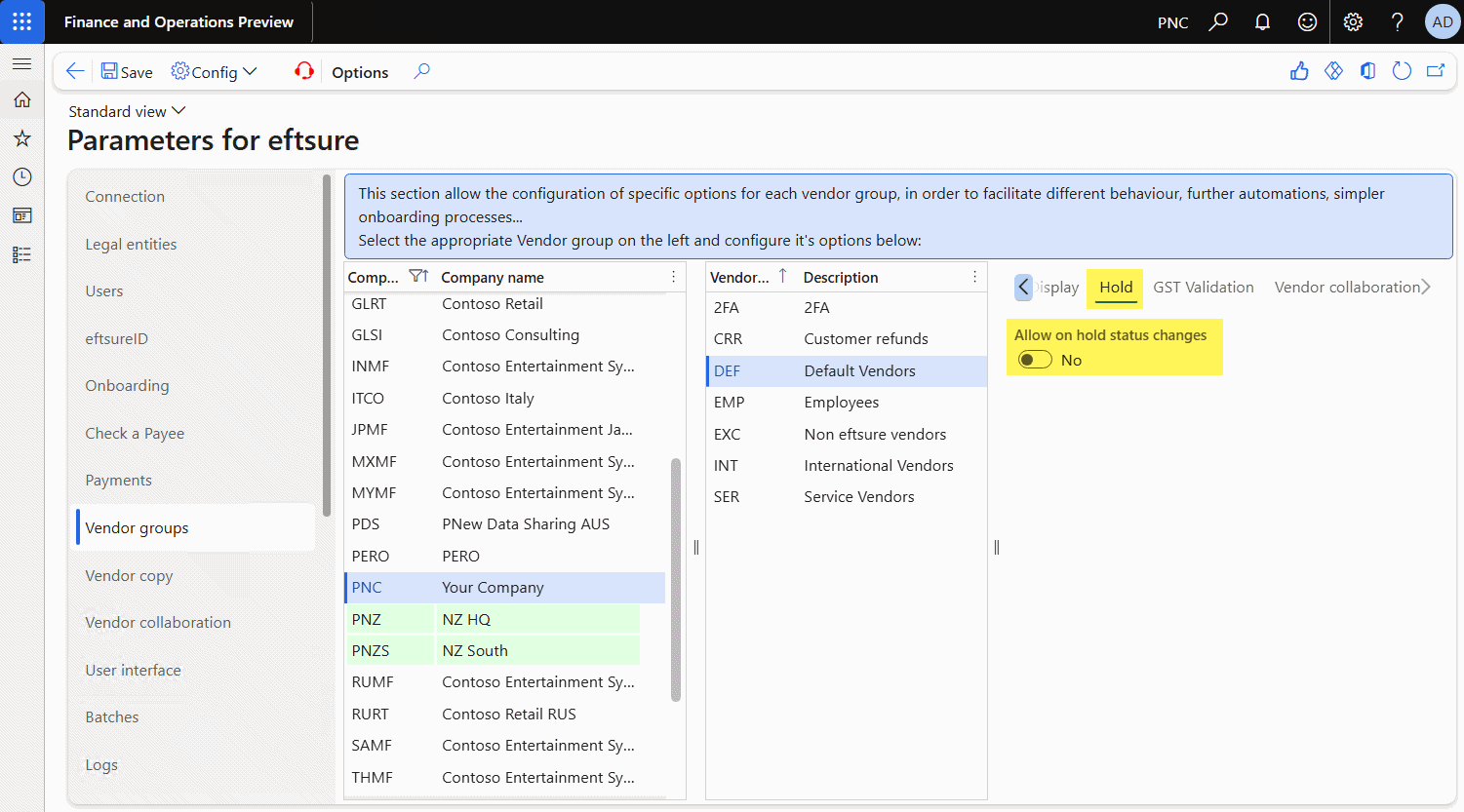
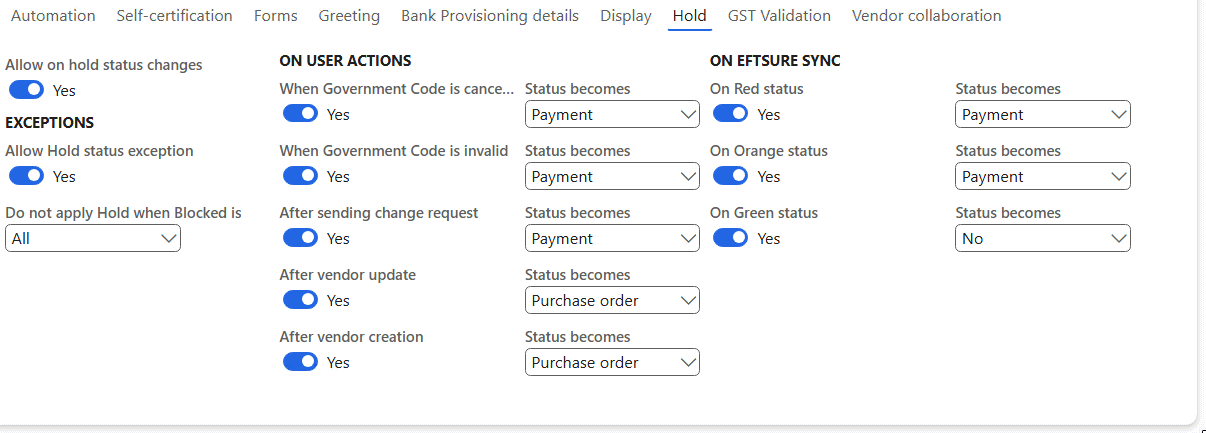
The above default configuration means the feature is turned off.
To enable changing vendor hold alongside Eftsure, tick Allow on hold status changes.
The following options will be displayed:
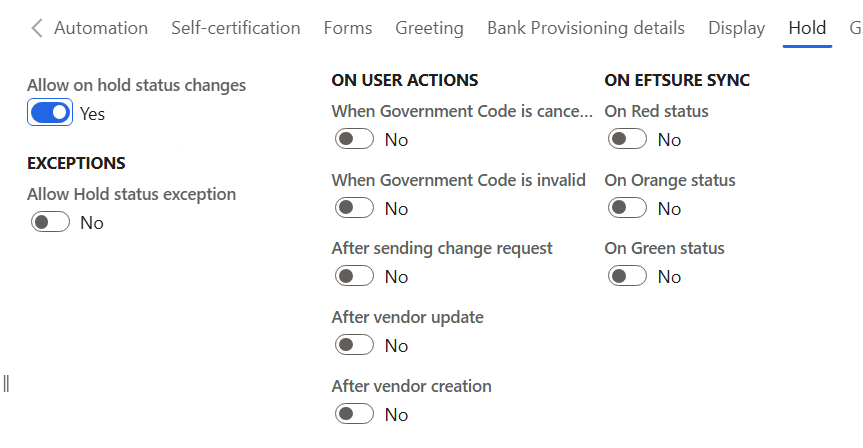
Exceptions
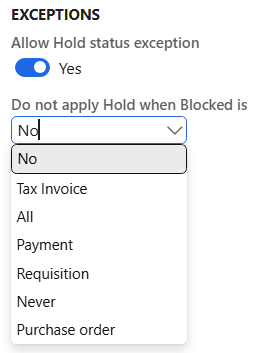
This section allows the configuration of exceptions where Eftsure will not apply the user actions and Eftsure sync rules.
If the feature is enabled and a status is selected, we will use it as a manual hold exception set by the user rather than automation, therefore the hold should survive all Eftsure actions.
In vendor sharing context, the process also apply matching legal entity blocking configuration for vendors copied into other legal entities or cross company data sharing.
This process applies the vendor's vendor group hold configuration from the copied legal entity, NOT the hold configured in the source vendor legal entity. We recommend sharing your vendor group configuration via Cross Company Data Sharing when applicable
Rules
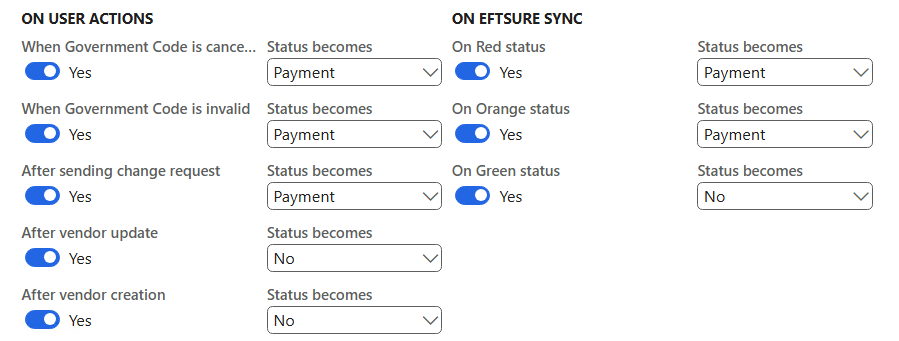
The following rules are available to help configure vendor hold status changes automation:
User actions
The On user actions group lists all potential actions by the user, and proposes the configuration of specific vendor blocking actions:
-
When government code becomes cancelled/invalid: Eftsure received notification that the current government code has become cancelled, a reasonable reason to put the vendor on hold.
-
After sending a change request: the end user has just sent a change request to the supplier and is likely to want to wait on the results of the change request before processing purchase orders, invoices or payments for this supplier.
-
After vendor creation/update: the user has approved the onboarding/change request and may want to allow further processing of purchase orders, invoices, or payments for this supplier.
Eftsure sync
The On Eftsure sync group lists all Eftsure synchronization actions, and proposes the configuration of specific vendor blocking actions:
-
On Red Status: Eftsure has set the bank account to red. Although payments will be denied, customers may also want to block the vendor.
-
On Orange status: Eftsure hasn't verified the bank account, it may have been manually created, customers may want to block the vendor until a successful verification occured.
-
On Green status: Eftsure has performed verification and confirmed bank details are green, which may be a great place to remove vendor lock.
Example
Let's consider the following example, which is a debatable configuration.
-
Any vendor blocked for All will REMAIN blocked for all, taking precedence over the following rules:
-
We will block the vendor for Payment when:
- government code becomes cancelled or invalid,
- user sends a change request,
- Eftsure marks the bank account Red or Orange.
This allows time for corrective action if/when necessary.
- We will block the vendor for Purchase orders when:
- Vendor has just been created
- Vendor has been updated
This allows time for review.
- We will also unblock the vendor when:
- if the bank account becomes green.
This configuration enables processing payments as soon as Eftsure confirms verification success.
Vendor inactivation
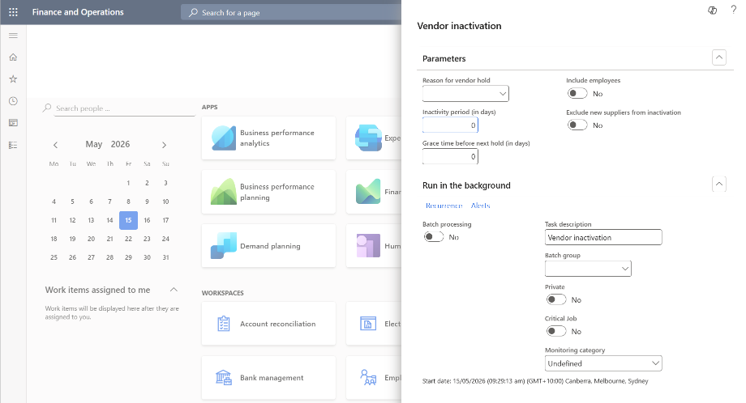
You can bulk update the on-hold status to All for vendors based on the selected criteria on the Vendor inactivation page, and assign a reason for why the vendor is on-hold.
The following criteria are used to include vendors that have been inactive in a period, include or exclude vendors that are employees, and exclude vendors that are under a grace time before the next hold.
Based on the number of days that you enter in the Inactivity period field on the Vendor inactivation page (Menu Procurement and sourcing > Periodic tasks > Vendors > Vendor inactivation), the application calculates the latest date where the vendor can have any activity to be considered inactive. That is, the current date minus the number of days that you enter. If one or more invoices exist for the vendor where the date is later than the calculated latest date, the vendor will be excluded from the inactivation. This is also validated if the vendor has payments after that date, open purchase requisitions, open purchase orders, requests for quotations, or replies.
The number of days in the Grace time before next hold field is used to calculate the latest grace date. That is, the current date minus the days that you enter. This only applies to vendors who have previously been deactivated. The application verifies the history of other occurrences of inactivation for the vendor and checks if the latest inactivation occurred before the latest grace date. If so, the vendor will be included in the inactivation process.
The parameter Include employees refers to vendors that are linked to an employee. You can set if you want to include those employees.
This process will always exclude vendors where the value in the Vendor hold field is Never.
Vendors that pass the validations are put on-hold, which sets the Vendor hold field value to All and the Reason to what has been selected. A record in the on-hold history is created for the vendor.
This feature is a standard Dynamics 365 Finance & Operations feature, not part of our Comfort Pack