
Icons
Eftsure status icons are documented in the Eftsure Workspace under the Legend tabs. For each icon, we provide a description and a recommended action for the user.
Icon bars
Eftsure icons appears based on the context (vendors, bank accounts,...), configuration, forms (vendors, invoices, payments, ...) and may appear in different fashion:
| Forms | Description | View |
|---|---|---|
| Vendors, Bank accounts... | All icons are displayed for complete status, Some icons are external links! |  |
| Invoices, Payments | Only the invoice / payment recommendation is displayed |  |
Hovering the icon provides additional information on potential blocks.
Icon details
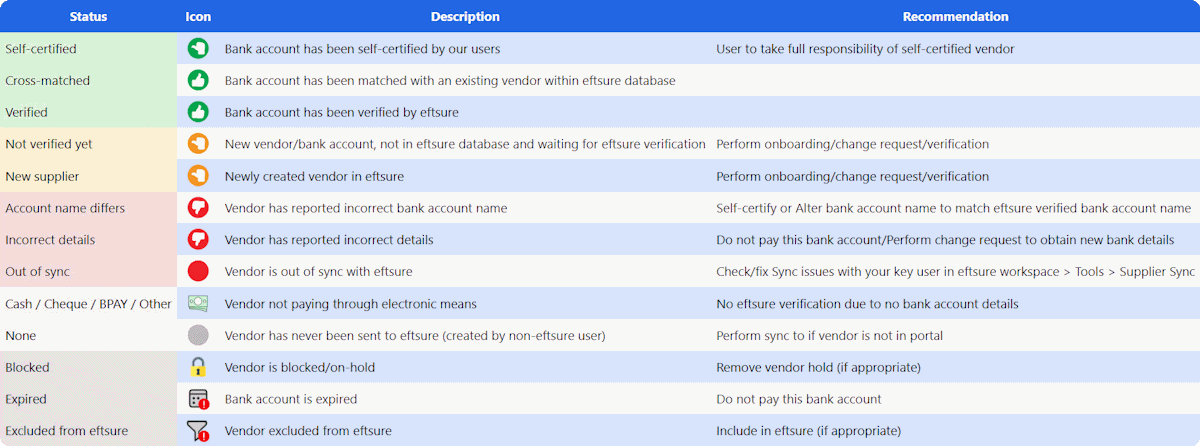
Verification status
This module uses the same images as Eftsure to display verification statuses. The following icons are available throughout the customized forms to highlight statuses:
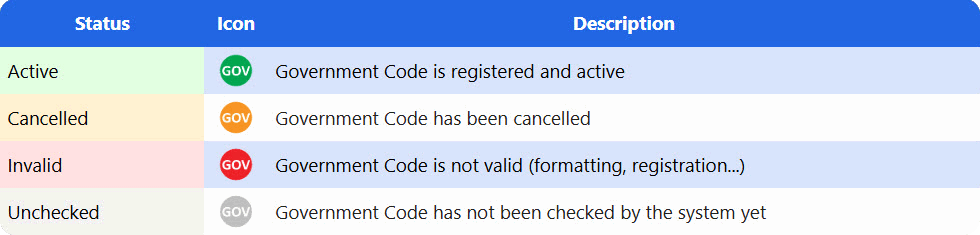
GovCode status
This module uses the same images as Eftsure to display government number statuses. The following icons are available throughout the customized forms to highlight statuses:
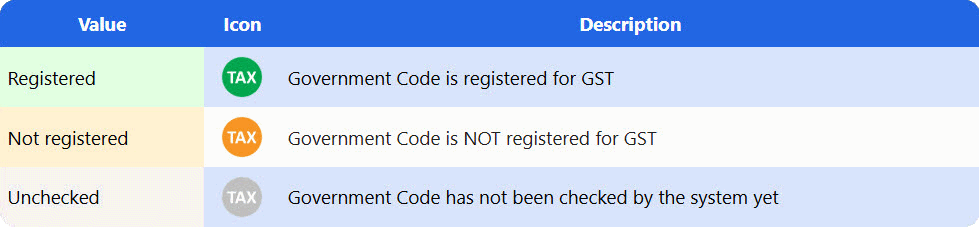
Tax registration status
This module uses the same images as Eftsure to display tax registration statuses. The following icons are available throughout the customized forms to highlight statuses:
Email
This module uses custom icons for displaying the status of the email address as declared by the vendor during onboarding. The following icons are displayed for each email validity verification:
